Close Menu
Sirus Gaming
    • News Stories
    • Features
    • Reviews
    • Previews
    • Guide
    • Review Policy
    • Privacy Policy
    • Contact
    What's New in Sirus?
    Quarantine Zone: The Last Check Featured Image Alt
    7

    Quarantine Zone: The Last Check – Review

    March 28, 2026
    BALL x PIT Review Featured Image Alt
    9

    BALL x PIT – Review

    March 28, 2026
    PS5 Price Increases in 2026

    Sony Raises PS5 Prices Again – Here’s What it Means for Gamers in 2026

    March 27, 2026
    Facebook X (Twitter) YouTube
    Sirus Gaming
    Sirus Gaming
    Phasmophobia friendly ghost mode featured image
    Guide

    Phasmophobia: How to Turn On Friendly Ghost Mode

    By Jarren NavarreteOctober 30, 20232 Mins Read
    Share
    Facebook Twitter LinkedIn Pinterest Email

    Phasmophobia has long since had malicious ghosts eager to get pesky paranormal investigators to join the other side. However not every dead spirit is a murderer with Kinetic Games finally adding the option to have a friendly ghost after a long time. In this guide, I’ll show you how to turn on friendly ghost so you can investigate without any worries.

    How to Enable Friendly Ghost

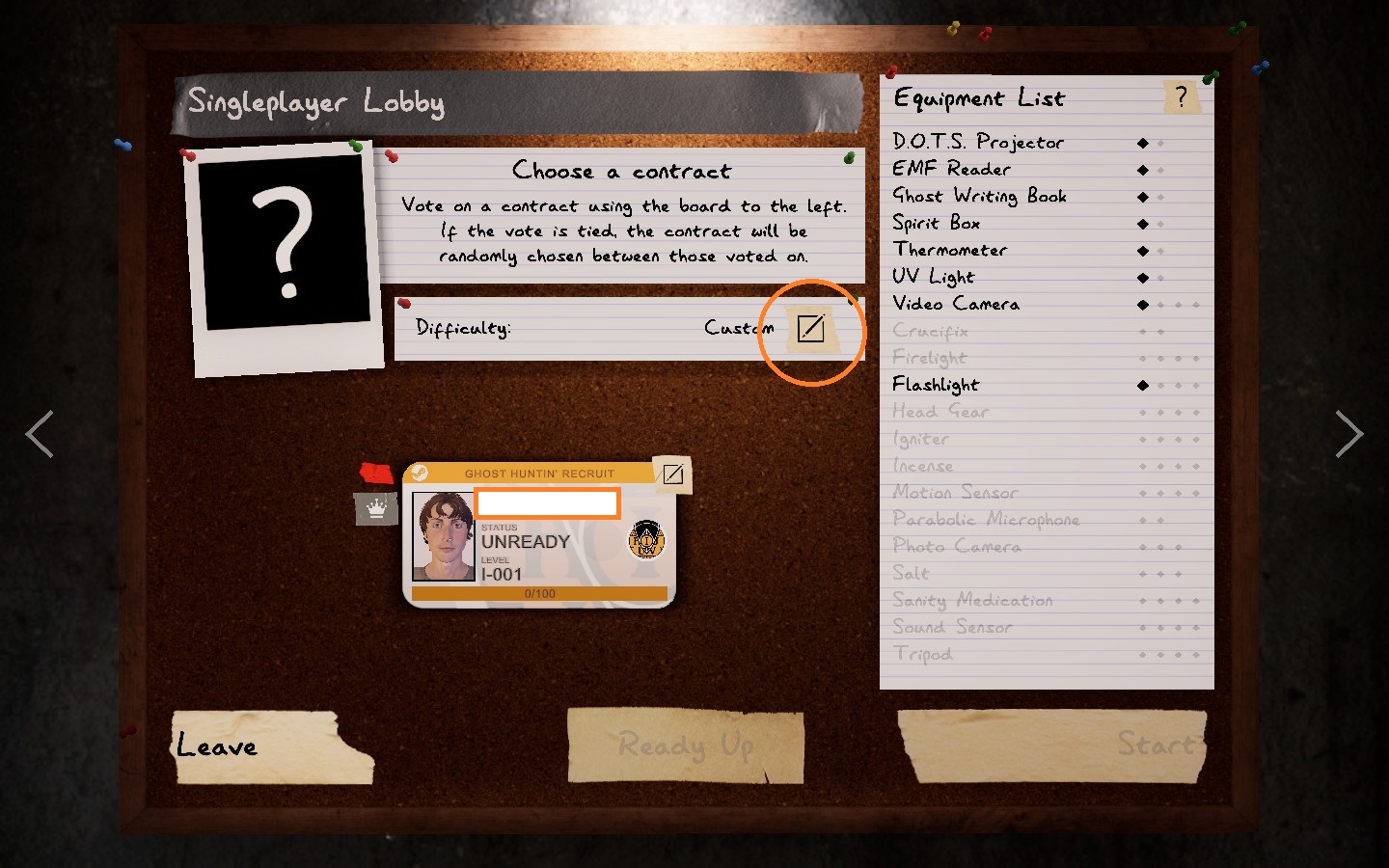
    Friendly Ghost can be turned on from the difficulty tab right under Ghost settings. Before you start a match in the lobby you’ll be able to pick what difficulty you want. Click on the edit icon next to the right of Difficulty.
    edit icon in the player lobby

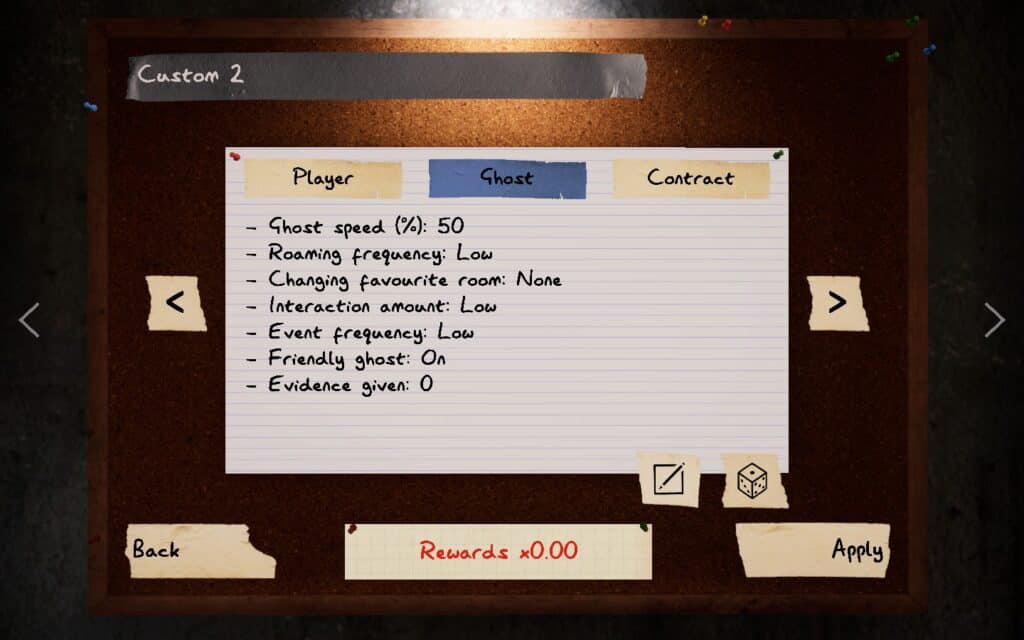
    This will take you to a page where you’ll see Player, Ghost, and Contract tabs. You can see the general view of each tab’s settings. Click on Ghost and then click on the edit icon on the bottom right side.
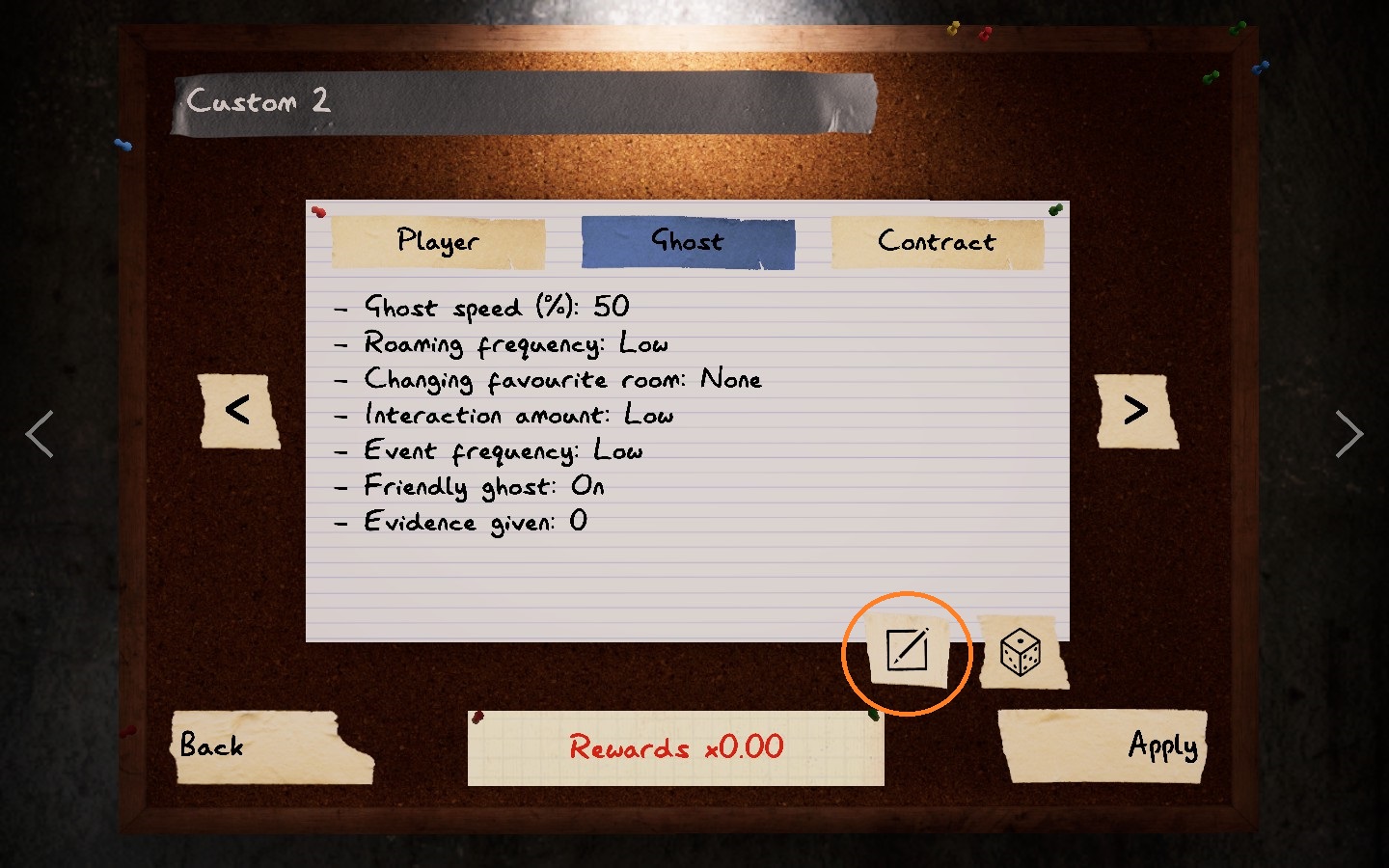
    edit the difficulty settings

    Scroll lower until you find the Friendly Ghost option. It’s turned off by default. Set it to On and then click on Apply. This will change the difficulty to Custom. Now click Back until you’re at the lobby and you’re free to start a match without the ghost hunting you.

    enable friendly ghost

    What Does Friendly Ghost Do?

    Friendly Ghost disables the ghost’s ability to hunt, meaning you and your friends can’t die. It will still cause Ghost Events and make other scary disturbances but you’ll be unharmed otherwise.

    There is a consequence to turning this setting on. For one, you can’t complete objectives that require the ghost to hunt players. You also can’t gain any rewards from investigations with Friendly Ghost turned on.

    This setting does make it easier to complete events such as finding the mysterious items and dancing snowmen for the Phasmophobia Holiday 2023 event. They’re a good way to speed run looking for limited-time collectibles if you don’t want to be disturbed by aggressive ghosts.

    Now why would Kinetic Games add Friendly Ghost as an option? If you were to ask us, it’s most likely to ease new players into getting familiar with maps and create a bigger player base. There are players who want to play Phasmophobia with friends but don’t want to lose their purchased equipment upon death. The Friendly Ghost setting makes Phasmophobia very approachable to new blood.

    Share. Facebook Twitter Pinterest LinkedIn Tumblr Email
    Jarren Navarrete

    Jarren is an aspiring author, programmer, and discerning critic. He's passionate about gaming and the immersion it offers. Well-versed in the gaming world, he's enthusiastic about writing guides to enhance your gaming experience. Beyond his dedication to gaming, Jarren is also a devoted fan of the Persona series.

    Related Posts
    Featured Image Phasmophobia Cursed Possessions Spawn Locations

    Phasmophobia All Cursed Items Locations Guide [UPDATED]

    August 23, 2024
    Point Hope Cursed Item Locations Phasmophobia Lighthouse

    Phasmophobia Lighthouse: Point Hope Cursed Item Locations

    August 23, 2024
    13 Willow Street Cursed Item Locations Phasmophobia

    Phasmophobia: 13 Willow Street Cursed Item Locations

    April 24, 2024
    Sirus Exclusives

    Starfield’s New Asteroid Base Changes Everything About Player Housing

    March 17, 2026

    Starfield Just Got Bigger: PS5 Launch, New Update, and DLC Explained

    March 17, 2026
    Starfield Freelanes update showing spaceship traveling through space with Cruise Mode and real-time exploration

    Starfield’s Free Lanes Update Changes How You Travel Space

    March 17, 2026
    Grand Theft Auto 6 trailer still showing Lucia overlooking Vice City skyline at sunset

    Tom Henderson GTA 6 Predictions Suggest Rockstar’s Next Big Move is Coming Soon

    February 11, 2026
    About Us
    About Us

    Sirus Gaming is a team of passionate gamers delivering the latest news, reviews, and insights on the gaming industry.

    Find us on OpenCritic, and we're proud to have been a voting jury in The Game Awards since 2022.

    Contact us: [email protected]

    Check Our Reviews
    Quarantine Zone: The Last Check Featured Image Alt
    7

    Quarantine Zone: The Last Check – Review

    March 28, 2026
    BALL x PIT Review Featured Image Alt
    9

    BALL x PIT – Review

    March 28, 2026
    Fatal-Frame-II-Crimson-Butterfly-Remake-featured-image
    7

    Fatal Frame II: Crimson Butterfly Remake – Review

    March 27, 2026
    Exclusive Content

    Starfield’s New Asteroid Base Changes Everything About Player Housing

    March 17, 2026

    Starfield Just Got Bigger: PS5 Launch, New Update, and DLC Explained

    March 17, 2026
    Starfield Freelanes update showing spaceship traveling through space with Cruise Mode and real-time exploration

    Starfield’s Free Lanes Update Changes How You Travel Space

    March 17, 2026
    Facebook X (Twitter) YouTube
    • Privacy Policy
    • Review Policy
    • Contact
    © 2026 Sirus Gaming. Designed by Sirus Media Digital.

    Type above and press Enter to search. Press Esc to cancel.