Close Menu
Sirus Gaming
    • News Stories
    • Features
    • Reviews
    • Previews
    • Guide
    • Review Policy
    • Privacy Policy
    • Contact
    What's New in Sirus?
    8

    PGA Tour 2K25 – Review

    March 17, 2026

    Starfield Is Coming to PS5 With a New Update and DLC

    March 17, 2026
    8

    God of War: Sons of Sparta – Review

    March 17, 2026
    Facebook X (Twitter) YouTube
    Sirus Gaming
    Sirus Gaming
    Lethal Company open secured doors featured
    Guide

    Lethal Company: How to Use Terminal to Open Secured Doors

    By Jarren NavarreteNovember 28, 20233 Mins Read
    Share
    Facebook Twitter LinkedIn Pinterest Email

    There are many locked, secure doors that can be opened with the Terminal in Lethal Company. It just isn’t clear how you go about this, which is unfortunate because quite a lot of the things you may need may be behind those locked doors. The only way to open those doors is through a terminal, which can be difficult to operate if you don’t exactly know how.

    In this guide, I’ll show you all the steps needed to open secured doors with the terminal, including some tips and tricks that you can use along the way in Lethal Company.

    How to Open Secured Doors with the Terminal

    You can open doors by inputting their associated codes through the Terminal at Home Base. The code (which is a letter and a number) you need to input will be displayed on the map at the door’s location. When successful, you’ll get the “Broadcast Special Code” notification.

    Here’s a more detailed way of how to open secured doors with the Terminal:

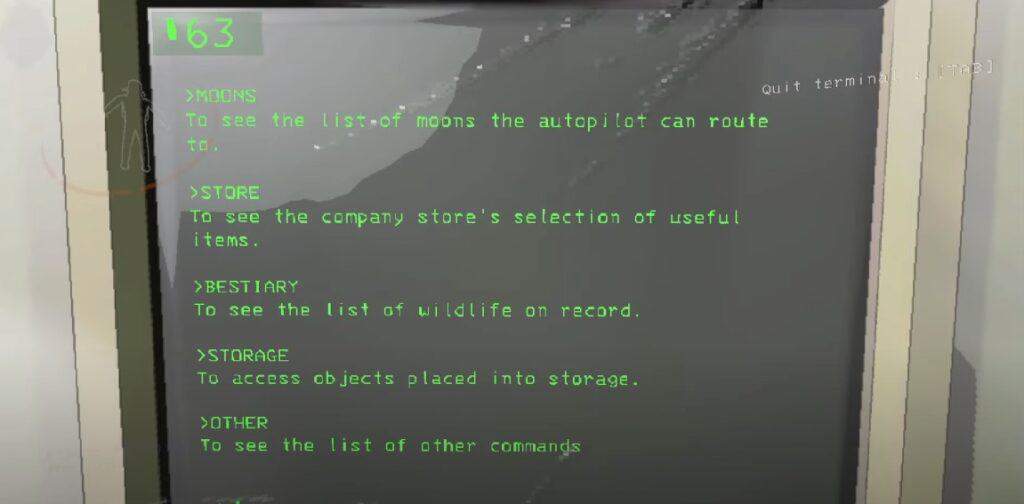
    • Go to the Home Base and interact with the Terminal by pressing E.
    • Type “Other“
    • Then type in “View Monitor“
    • Input “Switch [player name]” for the player next to the door you want to open
    • Look at the map for the code to the secured door (ex: E5, C4, B2)
    • Input it as a command and the door will open

    The Terminal you can open doors with is the same one where you buy equipment from. It should be noted that secured doors are the only type of doors that the Terminal can open. You’ll need to find keys for the average locked door in order to open them.
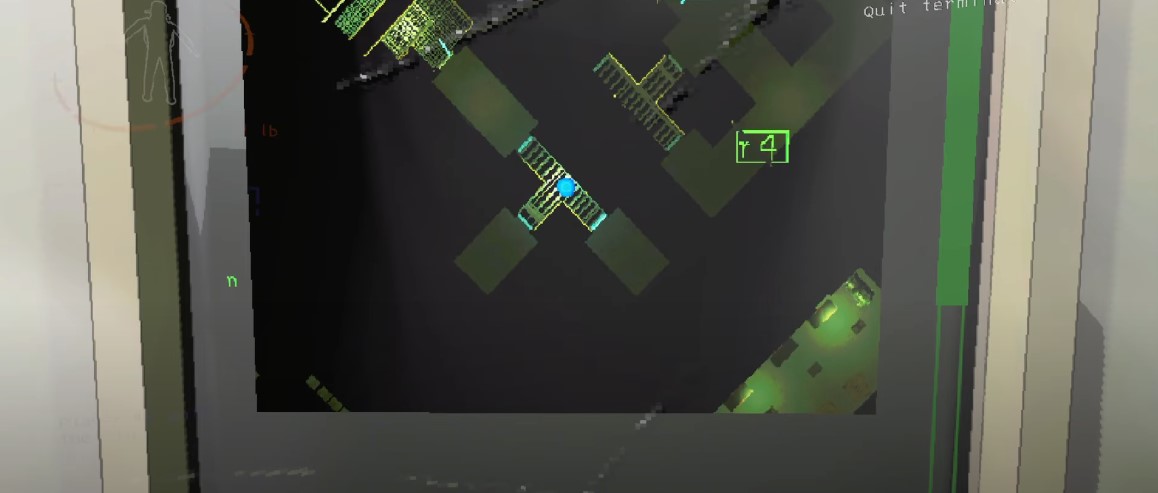
    Open Secured Doors with the Terminal

    When you’re looking at the monitor on the Terminal, the range is limited, so you may not see the door you’ll need to open. If you have a teammate that’s near that door, they can communicate the code to you, as the code itself is at the top of the door. Each secured door has a unique code. Otherwise, you’ll have to view it from their location by typing Switch and then the player’s name who’s near that secured door.

    It’s usually a good idea to save opening secured doors last from the Terminal. They usually contain a monster inside that could be dangerous to your teammates. Be careful not to lock them in by inputting the code twice.


    That explains all the important details on how to open secured doors using the terminal in Lethal Company. For more guides and walkthroughs, feel free to check out our main page for Lethal Company here.

    Share. Facebook Twitter Pinterest LinkedIn Tumblr Email
    Jarren Navarrete

    Jarren is an aspiring author, programmer, and discerning critic. He's passionate about gaming and the immersion it offers. Well-versed in the gaming world, he's enthusiastic about writing guides to enhance your gaming experience. Beyond his dedication to gaming, Jarren is also a devoted fan of the Persona series.

    Related Posts
    Lethal Company Signal translator Featured Image

    Lethal Company Signal Translator: How to Use it & Best Uses

    December 12, 2023
    Lethal Company How to Survive Masked Featured Image Alt

    Lethal Company Mask (Masked): How to Survive & Deal with Them

    December 11, 2023
    Lethal Company Nutcracker How to Survive Featured Image Alt

    Lethal Company Nutcracker: How to Survive & Deal with Them

    December 11, 2023
    Sirus Exclusives

    Starfield’s New Asteroid Base Changes Everything About Player Housing

    March 17, 2026

    Starfield Just Got Bigger: PS5 Launch, New Update, and DLC Explained

    March 17, 2026
    Starfield Freelanes update showing spaceship traveling through space with Cruise Mode and real-time exploration

    Starfield’s Free Lanes Update Changes How You Travel Space

    March 17, 2026
    Grand Theft Auto 6 trailer still showing Lucia overlooking Vice City skyline at sunset

    Tom Henderson GTA 6 Predictions Suggest Rockstar’s Next Big Move is Coming Soon

    February 11, 2026
    About Us
    About Us

    Sirus Gaming is a team of passionate gamers delivering the latest news, reviews, and insights on the gaming industry.

    Find us on OpenCritic, and we're proud to have been a voting jury in The Game Awards since 2022.

    Contact us: [email protected]

    Check Our Reviews
    8

    PGA Tour 2K25 – Review

    March 17, 2026
    8

    God of War: Sons of Sparta – Review

    March 17, 2026
    Resident-Evil-Requiem-Review
    10

    Resident Evil Requiem – Review

    March 12, 2026
    Exclusive Content

    Starfield’s New Asteroid Base Changes Everything About Player Housing

    March 17, 2026

    Starfield Just Got Bigger: PS5 Launch, New Update, and DLC Explained

    March 17, 2026
    Starfield Freelanes update showing spaceship traveling through space with Cruise Mode and real-time exploration

    Starfield’s Free Lanes Update Changes How You Travel Space

    March 17, 2026
    Facebook X (Twitter) YouTube
    • Privacy Policy
    • Review Policy
    • Contact
    © 2026 Sirus Gaming. Designed by Sirus Media Digital.

    Type above and press Enter to search. Press Esc to cancel.